
Rylo: Live Call Captions
Rylo HQCommunication
4.6998.00 Reviews
- Version
- 2.0.24
- Installs
- 100.00K
- Age Rating
- Everyone
Screenshots
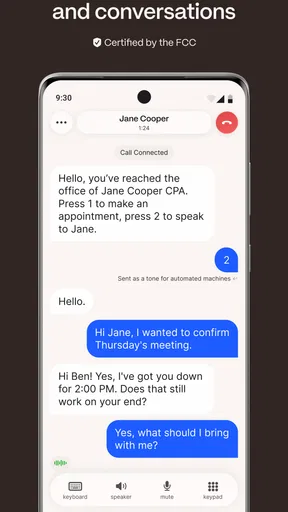
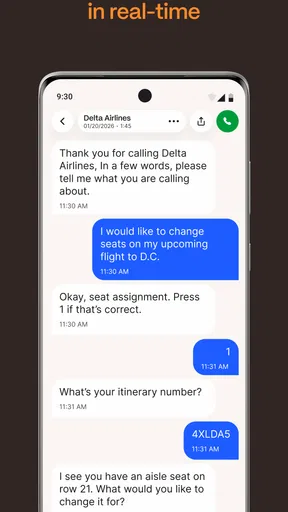
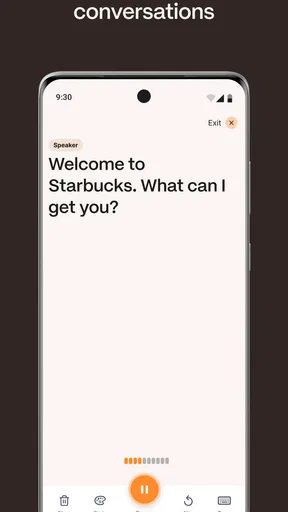
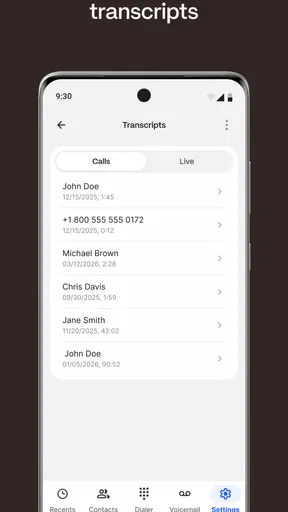
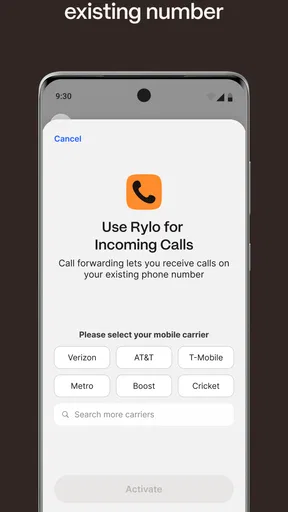
Our Review of Rylo: Live Call Captions
 Analysis by Appyee
I noticed Rylo: Live Call Captions for a very practical reason: it focuses on one communication problem instead of trying to become an all-purpose messaging platform. Developed by Rylo HQ, this free communication app is designed to show live captions during phone calls for deaf and hard-of-hearing users. That narrow purpose gives it an immediate first-week appeal. When a phone conversation is difficult to follow by sound alone, having the spoken words appear on the screen can make the call feel more manageable and less stressful.
My overall impression is that Rylo earns attention because it addresses a recurring need rather than offering a novelty effect. At the same time, its lasting value depends on how naturally it fits into your calling habits. A captioning tool is useful only when it is ready at the moment a call arrives, easy to read while the conversation continues, and dependable enough that you do not spend more energy managing the tool than participating in the call.
How Rylo feels during the first week
The first few uses are easy to understand conceptually. You make or receive a phone call, keep the app available, and use the live text to follow what is being said. The benefit is clearest in situations where listening is tiring, voices are unclear, or background sound makes ordinary phone audio unreliable. Instead of asking the other person to repeat every sentence, I can use the written conversation as an additional path for understanding.
That makes the app especially appealing for short but important calls: arranging an appointment, speaking with a service provider, confirming delivery details, or handling a conversation with someone whose voice is unfamiliar. These are precisely the moments when missing one phrase can create confusion. Captions give me something concrete to check rather than relying entirely on memory or guesswork.
The experience is also more personal than a generic transcription tool. Rylo is not primarily about turning meetings, lectures, or recorded audio into text. Its identity is tied to live phone conversations, so the useful question is not whether it has a long list of features. The useful question is whether it helps two people stay connected when ordinary voice calling is not accessible enough on its own.
During the first week, I would test it with people who are patient and comfortable with a brief adjustment period. That makes it easier to notice how quickly the words appear, whether the text is comfortable to follow, and how well the conversation works when both speakers change topics quickly. I would also try a quiet call and a noisier one, because a captioning app can feel excellent in a calm setting and much less comfortable when the audio becomes messy.
One practical habit makes a difference: I would open the app before an expected call rather than waiting until the phone is already ringing. That small change reduces the pressure of setting things up while the other person is saying hello. For recurring calls, keeping the app in the same place on the phone also matters. Accessibility tools are most useful when they become part of a routine instead of an emergency solution I have to remember from scratch.
A realistic everyday scenario
Imagine receiving a call from a clinic while you are at home, with a television or kitchen noise in the background. You can hear parts of the conversation, but names, times, and instructions are easy to miss. With Rylo available, I can look at the live words while listening, use the text to confirm a detail, and ask a focused question when something still seems unclear. The app does not remove the need to communicate, but it can reduce the exhausting effort of reconstructing every sentence.
That distinction is important. Captions are support, not a guarantee that every word will be perfect. Names, accents, rapid speech, interruptions, and unusual terms can still create trouble. I would never treat the text as an unquestionable record for medical, legal, financial, or safety-critical instructions. In those situations, I would repeat important details aloud, ask the caller to spell names, or request written confirmation through a channel that is appropriate for the conversation.
The first-week appeal is therefore strongest when expectations are realistic. Rylo can make a phone call more accessible, but it cannot make poor audio clear, turn a rushed speaker into a careful one, or replace the value of a written message when exact wording matters.
Who benefits most from the focused design
The clearest audience is deaf and hard-of-hearing users who want to keep using ordinary phone calls with more control over the conversation. It may also help people who regularly struggle with speech clarity or listening fatigue, especially when they prefer a phone call to a text exchange. Family members and friends can benefit indirectly because the conversation may require fewer repetitions and less awkward repair work.
I would be more cautious about recommending it to someone who rarely makes phone calls or already communicates comfortably through text, email, or video chat with built-in accessibility tools. If almost all of your conversations happen in written form, Rylo may not become a daily habit. The app is most convincing when phone calls remain a necessary part of your life.
Its age rating is Everyone, which matches the straightforward nature of the tool. It is not presented as entertainment or a social network. That makes it suitable to consider for a broad range of users, although the real decision should be based on communication needs and whether live phone captions fit the way a person prefers to interact.
What remains useful after the novelty fades
The month-to-month value comes from repetition. A translation app may be opened for a trip, and a novelty recorder may be abandoned after a few experiments. Rylo has a better chance of staying installed because the underlying need can return every week: a call from work, a conversation with family, an appointment, or an unexpected number that cannot be handled through messaging.
Its current version is 2.0.12, and the app supports Android 7.0 and later. For someone using an older but still serviceable Android phone, that compatibility can make the app easier to consider than a tool that demands a recent device. I would still check that the phone performs comfortably during calls and that the screen is easy for me to read, because the practical experience depends on the whole device, not only the app.
One of the strongest long-term advantages is reduced cognitive load. Without captions, I may concentrate so intensely on hearing each word that I lose track of the meaning of the conversation. With text available, I can divide that effort between listening and reading. Over time, that can make phone calls feel less like tests of endurance. The value is not excitement; it is the possibility of finishing an ordinary call with more energy left afterward.
Another useful workflow is to treat the captions as a prompt for clarification rather than as a reason to stay silent. If a sentence looks incomplete or confusing, I can respond immediately with a specific question: “Did you say Tuesday or Thursday?” That is more efficient than waiting several minutes and then trying to reconstruct the entire exchange. The app works best when it supports active conversation instead of encouraging passive trust in the text.
For repeated contacts, I would develop a simple call routine. Before answering, I would make sure the phone is positioned where the screen is visible, reduce nearby noise when possible, and tell the other person that I am using live captions. That last step can prevent confusion if I pause briefly or ask for a sentence to be repeated. It also turns accessibility into a normal part of the call rather than something I have to hide or explain defensively.
How it compares with ordinary alternatives
The usual alternative is texting. Text messages are often better when the information must be exact, when the conversation is not urgent, or when both people are comfortable typing. They also create a written exchange that is easier to review. However, texting can be slow, inconvenient for complex back-and-forth discussion, and unsuitable when the other person insists on calling. Rylo fills that specific gap by making the phone call itself more usable.
Video calls with captions can be a stronger choice when seeing the other speaker improves understanding or when the service offers more mature caption controls. They may also provide better context through facial expressions and visual cues. On the other hand, they require both people to use the same kind of service and may be awkward when a company, office, or unfamiliar contact simply places a normal phone call. Rylo’s appeal is that it stays focused on that ordinary call format.
Manual note-taking is another fallback, but it divides attention and is poor at capturing fast conversation. Asking someone to repeat everything is workable for a brief exchange, yet frustrating when it becomes the main method of communication. Rylo does not eliminate these alternatives; it gives me another option when the other choices are slower, more demanding, or unavailable.
The trade-off is specialization. A broader accessibility suite may offer captions across videos, meetings, and other audio sources, while Rylo’s reason to exist is much narrower. If I want one tool for every kind of spoken content, I may prefer a wider solution. If my recurring problem is specifically phone calls, a focused app can be easier to understand and easier to remember.
The maintenance burden is small, but the routine matters
An app like this does not demand the same maintenance as a large social platform. There are no feeds to curate, profiles to polish, or communities to monitor. That is a genuine strength. Once I understand how it fits into a call, the main maintenance task is remembering to use it and keeping the phone ready for the situation.
Still, accessibility tools can fail through small points of friction. A user may forget to open the app, place the phone where the screen cannot be seen, or discover that reading while speaking feels awkward. The solution is not complicated, but it does require a habit. I would practice with a trusted contact before relying on Rylo for an important call, especially if I am new to live captions.
I would also keep a backup plan. For an appointment or a conversation involving precise instructions, that might mean asking the other person to send the key details by message afterward. For an unexpected call, it could mean explaining that I need the speaker to slow down or repeat information. The best use of Rylo is as a layer of access, not as the only safeguard for important information.
Screen comfort deserves attention as well. Reading a live conversation can be tiring if the phone is held too far away, if the display is too dim, or if the user has to keep shifting between the text and the call controls. I would adjust the phone’s display settings to suit my eyesight and use a stable position during longer conversations. This is not a glamorous tip, but it can determine whether the app remains helpful after the first few calls.
There is also a social maintenance element. Some callers may not understand why pauses occur or why I look at the phone while they speak. A quick explanation at the beginning can make the interaction smoother. Once regular contacts know that the captions help me follow the conversation, the tool becomes less disruptive and more like any other communication accommodation.
Where fatigue can build up
Live captions can reduce listening strain, but they can also introduce reading strain. Following moving text while forming a response is not effortless. During a long call, I may find myself switching between hearing, reading, remembering, and speaking. If the text arrives in a way that is difficult to follow, the app can feel like an additional task rather than relief.
Fast speakers are another challenge. When someone talks quickly, interrupts, or changes direction without pauses, the captions may be harder to use in real time. A short delay can matter because the conversation has already moved on by the time a phrase appears. In those moments, I would slow the exchange deliberately instead of trying to chase every line on the screen.
Background noise can create a similar problem. The app can only work with the audio that reaches the phone. A noisy room, speakerphone echo, or several people talking at once can make the text less dependable. I would not judge the app solely by a difficult environment, but I would include those conditions in my decision about when to use it. For a crowded public place, a text-based alternative may be less frustrating.
Privacy and comfort also influence long-term use, even without turning the app into a source of anxiety. A phone call may contain personal information, and some users may feel uneasy having the conversation displayed as text. I would use the app thoughtfully, keep the screen positioned so unintended viewers cannot easily read it, and avoid assuming that captions make every conversation appropriate for public spaces.
These are not reasons to dismiss Rylo. They are reasons to match it to the right call. It is a strong candidate for ordinary one-to-one conversations where the phone connection is usable and the user wants visual support. It is a weaker choice for chaotic group discussions, highly confidential exchanges in shared spaces, or situations where exact wording must be preserved without error.
What the community response suggests
Rylo has an average rating of 4.2 from around 2.1 thousand ratings, with over 700 written reviews and more than 100 thousand installs. Those figures suggest that the app has reached a meaningful audience and that many users find the central idea worthwhile. I would interpret that reception as encouragement to try it, not as proof that every call will be effortless. Accessibility experiences vary widely with hearing needs, device setup, speaking style, and environment.
The developer, Rylo HQ, has kept the product’s identity clear: this is a communication app built around live call captions. That clarity helps me decide quickly whether it belongs on my phone. I do not need to sort through entertainment features or unrelated tools to understand its purpose. The more important test is personal: do phone calls occur often enough in my life for a focused captioning tool to earn a permanent place?
Because it is free, the cost of trying it is low in financial terms. The more meaningful cost is attention. I have to learn the routine, tell callers what to expect, and decide when captions are reliable enough for the conversation. For someone who makes only occasional calls, that preparation may feel like too much. For someone who regularly misses words or avoids calls because listening is exhausting, the same effort can be well worth it.
My long-term verdict
I would recommend Rylo to deaf and hard-of-hearing users who want a practical way to make regular phone calls more accessible, especially when texting is not a realistic substitute. Its lasting strength is not a flashy feature set. It is the chance to turn a difficult, tiring phone call into a conversation I can follow with more confidence.
I would not recommend relying on it blindly for critical details, crowded environments, or rapid multi-person discussions. In those cases, written communication, a video service with suitable captions, or a direct request for follow-up information may be better. Someone who almost never uses phone calls should also consider whether the app will become a habit or simply remain unused after an initial test.
After the novelty fades, Rylo’s value comes down to recurring usefulness. If I regularly face calls that are hard to hear, the app can justify its place by helping with ordinary tasks that happen again and again. If my communication is already mostly text-based, its focused design may not add enough. For the right user, Rylo is less a gadget than a dependable bridge between voice calling and visual communication.
My final advice is to test it with a trusted person, then try it in one realistic situation where captions would genuinely help. Pay attention not only to whether words appear, but also to how tired you feel after the call, how easily you can respond, and whether you remember to use the app without stress. If it reduces effort and becomes part of your normal calling routine, Rylo earns lasting space on the phone. If it adds more reading and setup than relief, a written or video-based alternative is likely the better long-term choice.
Privacy and Permissions
See what permissions an app requests and how it handles your data.
- Contacts
- read your contacts, modify your contacts
- Location
- precise location (GPS and network-based)
- Phone
- directly call phone numbers, read phone status and identity
- Photos/Media/Files
- read the contents of your USB storage, modify or delete the contents of your USB storage
- Storage
- read the contents of your USB storage, modify or delete the contents of your USB storage
- Camera
- take pictures and videos
- Microphone
- record audio
- Wi-Fi connection information
- view Wi-Fi connections
- Device ID & call information
- read phone status and identity
- Other
- view network connections, pair with Bluetooth devices, disable your screen lock, full network access, change your audio settings, run at startup, draw over other apps, control vibration, prevent device from sleeping
Verdict
Strengths of Rylo: Live Call Captions
- Captions appear in real time during supported calls.
- Useful for users who are deaf or hard of hearing.
- Can make phone conversations easier in noisy surroundings.
- Simple design keeps the focus on the active conversation.
- May improve confidence when communicating by phone.
Limitations of Rylo: Live Call Captions
- Accuracy can vary with accents, speech speed, and background noise.
- Requires microphone and call-related permissions to work properly.
- Some features may depend on device or operating system compatibility.
- Live captions can introduce delays or occasional transcription errors.
- Privacy concerns may arise when processing sensitive conversations.
Similar Picks in This Category
View All
Google Messages
Google LLC4.6

Gmail
Google LLC4.1

Google Meet
Google LLC4.4

Google Chrome
Google LLC4.1

WhatsApp Messenger
WhatsApp LLC4.6

Carrier Services
Google LLC4.2
Frequently Asked Questions
What is Rylo: Live Call Captions, and how does it work?
Rylo: Live Call Captions is designed to display spoken dialogue as text during phone or voice conversations, helping users follow calls when hearing audio is difficult or when the surroundings are noisy. After setup, the app processes the conversation and presents captions on screen in near real time. Caption speed and accuracy can vary depending on pronunciation, background noise, connection quality, and the device.
Does Rylo: Live Call Captions support every phone call and messaging app?
Compatibility depends on the platform, device model, operating-system version, and the type of call being made. Standard cellular calls may work differently from calls placed through apps such as WhatsApp, FaceTime, Messenger, or other VoIP services. Before downloading, check Rylo’s current store listing and permissions information to confirm whether your preferred calling method is supported on Android or iOS.
Are Rylo’s live captions accurate and available without delay?
Rylo can make conversations easier to follow, but its captions should not be treated as a perfect transcript. Recognition may be affected by accents, fast speech, overlapping voices, technical terms, poor microphones, and background sounds. A small delay is also normal because speech must be captured and converted into text. For important information, users should confirm names, numbers, addresses, and instructions.
Does Rylo: Live Call Captions record or store my conversations?
Call-captioning apps may require access to audio, microphone functions, notifications, or other system features in order to generate text. The exact handling of conversations, transcripts, and diagnostic data can change with app updates, so review Rylo’s privacy policy and permissions before use. Avoid discussing highly sensitive information until you understand whether audio or caption data is processed locally or sent to online services.
Is Rylo: Live Call Captions free to download, and are there extra costs?
The app’s download price, available features, subscriptions, and usage limits may differ by country, platform, and account type. Some captioning services offer a free tier but reserve extended call time, advanced tools, or unlimited usage for a paid plan. Check the Google Play Store or Apple App Store listing for the current pricing, trial conditions, renewal terms, and cancellation instructions before starting a subscription.
